
How to Design Fiverr Gig Images That Get Clicks – Complete Guide
How to Design Fiverr Gig Images That Get Clicks (Complete Guide)
When a buyer searches for a service on Fiverr, the first thing they see is not your description or your experience. The first thing they notice is your gig image. This single image decides whether a buyer clicks on your gig or scrolls past it.
Many new sellers spend hours writing a gig description but forget that a powerful Fiverr gig image is what actually brings visitors to the gig. A well-designed image can increase your clicks, improve your ranking, and help you get more orders.
In this guide, you will learn how to design Fiverr gig images that attract buyers and get more clicks, even if you are a beginner.
Why Fiverr Gig Images Are So Important
Before learning how to design a gig image, it is important to understand why it matters so much.
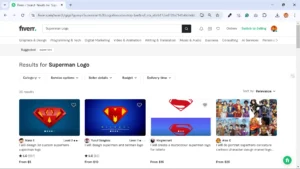
When buyers search on Fiverr, they see many gigs at the same time. Each gig shows a small image along with the title and price. Because buyers are usually in a hurry, they quickly scan these images and click on the one that looks most professional and clear.
A strong gig image can help you:
-
Increase your click-through rate (CTR)
-
Make your gig look more professional
-
Build trust with potential buyers
-
Stand out from competitors
-
Get more orders on Fiverr
If your image looks confusing, crowded, or low quality, buyers will simply move to the next gig.
Fiverr Gig Image Size and Requirements
Before designing your image, you must follow Fiverr’s recommended size and guidelines.
Recommended Fiverr gig image size:
-
1280 × 769 pixels
Important tips:
-
Use high-quality images
-
Avoid blurry graphics
-
Keep the design simple and clean
-
Do not add too much text
Using the correct size ensures that your gig image looks clear on both desktop and mobile devices.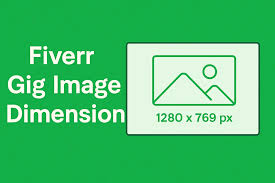
Understand What Buyers Want
A good gig image is not just about design. It is about communication.
Your image should quickly answer three questions in the buyer’s mind:
-
What service are you offering?
-
Why should they choose you?
-
Is your gig professional and trustworthy?
For example, if someone searches for logo design, they want to see a gig image that clearly shows logo samples or strong branding visuals.
If the buyer cannot understand your service within a few seconds, they will likely skip your gig.
Keep the Design Simple and Clear
One common mistake beginners make is adding too many elements to the image. They add different fonts, colors, shapes, and long sentences.
This usually makes the image look messy.
A strong Fiverr gig image should be simple and easy to read.
Good practices include:
-
Use one clear headline
-
Use 2–3 colors only
-
Add a simple background
-
Highlight the main service
For example:
Instead of writing a long sentence like:
“Professional and High Quality Modern Logo Design Services for Your Business”
You can simply write:
“Modern Logo Design”
Short text is easier to read and looks more professional.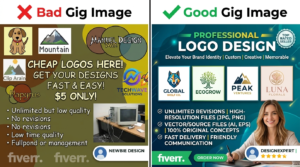
Use Bold and Readable Text
Most buyers view Fiverr on their phones. This means your text must be large and readable even on a small screen.
Tips for text design:
-
Use bold fonts
-
Avoid complicated fonts
-
Make the main text large
-
Use high contrast colors
For example:
-
White text on a dark background
-
Black text on a light background
This helps your message stand out and makes the image easier to understand.
Show the Value of Your Service
Your gig image should highlight what makes your service special.
For example, you can add small points like:
-
24 Hour Delivery
-
Unlimited Revisions
-
High Quality Design
-
Professional Service
These short benefits help buyers quickly understand the value you offer.
But remember not to add too many points. Two or three highlights are enough.
Use High Quality Graphics or Examples
If your service involves design, always include examples of your work.
For example:
-
Logo designers can show sample logos
-
Website designers can show website previews
-
Video editors can show editing scenes
Real examples increase trust and make your gig look more professional.
Buyers feel more confident when they can see what they are going to receive.
Choose the Right Colors
Color plays an important role in attracting attention.
Bright and balanced colors can make your gig stand out in search results.
Good color combinations include:
-
Blue and white
-
Black and gold
-
Yellow and black
-
Purple and white
Avoid using too many colors because it can make the image look unprofessional.
Stick to two or three main colors for a clean design.
Study Top Ranking Fiverr Gigs
One of the best ways to improve your gig image is to learn from successful sellers.
Search your service on Fiverr and look at the top ranking gigs.
Observe things like:
-
What colors they use
-
How much text they add
-
What type of graphics they include
-
How simple their design is
You will notice that many top gigs follow the same rule: clear message, simple design, and bold text.
Learning from successful examples can help you design a better gig image.
Use Simple Design Tools
You do not need advanced design skills to create a good Fiverr gig image.
Many beginners use simple tools like:
-
Canva
-
Photoshop
-
Figma
-
Photopea
Among these, Canva is very beginner friendly. It has ready-made templates that can help you create a professional gig image quickly.
Steps to create a gig image in Canva:
-
Open Canva
-
Create a custom design with size 1280 × 769
-
Choose a simple background
-
Add your main headline
-
Add icons or examples of your work
-
Export the image in high quality
This process usually takes only a few minutes.
Avoid Common Fiverr Gig Image Mistakes
Many new sellers make small mistakes that reduce their chances of getting clicks.
Here are some common problems you should avoid.
Too Much Text
Long paragraphs make the image hard to read.
Low Quality Images
Blurry or pixelated images look unprofessional.
Copying Other Sellers
It is fine to learn from others, but copying their design exactly can hurt your brand.
Confusing Design
If the buyer cannot quickly understand your service, they will move to another gig.
Avoiding these mistakes can significantly improve your gig performance.
Test Different Gig Images
Sometimes the first design may not give the best results. That is normal.
Successful sellers often test different gig images to see which one performs better.
You can try changing:
-
Colors
-
Headline text
-
Background style
-
Layout
After a few weeks, check which design gets more clicks and keep the best one.
Small changes can sometimes make a big difference.
Optimize Your Gig Along With the Image
A great image alone is not enough. To rank higher on Fiverr, your entire gig should be optimized.
This includes:
-
Using the right SEO keywords
-
Writing a clear gig title
-
Adding a detailed description
-
Choosing the correct tags
-
Providing high quality service
When all these elements work together, your gig has a better chance of ranking higher in Fiverr search results.
Final Thoughts
Designing a strong Fiverr gig image is one of the most important steps for attracting buyers. A clear and professional image can increase your clicks, improve your gig ranking, and help you get more orders.
Remember these key points:
-
Keep your design simple and clear
-
Use bold and readable text
-
Highlight the main service
-
Use high quality graphics
-
Follow Fiverr’s recommended image size
-
Study successful gigs for inspiration
If you focus on creating a clean and professional gig image, you will stand out from many other sellers.
Success on Fiverr does not happen overnight, but with the right presentation and consistent effort, you can build a strong profile and attract more clients over time.
Start improving your gig images today, and you may notice a big difference in how buyers respond to your services.